Under the Hood
Infrastructure as Code
Section titled “Infrastructure as Code”Vizier is for developers who want to deploy their applications to AWS with a faster and easier setup compared to manual clicking in the AWS console or writing their own CloudFormation templates. Vizier needs to take user input, such as the type of application to be deployed and the location of files to be uploaded, and then communicate with AWS to provision and configure those resources on behalf of the user. The AWS console is designed for humans, but Vizier needs programmatic access to AWS.
AWS provides several first party tools besides the console for controlling AWS resources. The AWS CLI lets developers control AWS via shell commands. The AWS Software Development Kit (SDK) allows similar control through libraries for programming languages like Python and JavaScript. Vizier is a Typescript program, so the SDK was a natural choice. Its chief downside for Vizier is its granularity. Deploying many interconnected resources calls for a higher level of abstraction, which is available in Infrastructure as Code tools.
When developers manually tweak infrastructure, the resulting state is difficult to reproduce. It is impractical to document every step taken, and further changes over time cause an environment to “drift,” becoming a “snowflake environment” (unique, in a bad way). To address this pitfall, many developers implement configuration programmatically, i.e. in code. With this approach, called Infrastructure as Code (IaC), infrastructure configuration exists as concrete files checked into source control.
IaC can be imperative, specifying steps to take, or declarative, specifying the desired end result. Declarative IaC tools can also abstract away many steps of infrastructure configuration, letting developers think about the final outcome without worrying about the order in which resources need to be provisioned.
We considered different IaC tools with streamlined declarative interfaces, most notably AWS’s own Cloud Development Kit (CDK) and Terraform from HashiCorp. CDK is a higher level interface on top of AWS CloudFormation (CF), generating CF templates and deploying CF stacks of provisioned resources. Terraform works with all major cloud providers, specifying infrastructure configuration through files written in the proprietary declarative language HashiCorp Configuration Language (HCL). Terraform likely could have served our needs, but in the end we chose CDK for its more direct integration with AWS.
Here is a comparison of some SDK and CDK code accomplishing roughly the same thing. Please note that code has been simplified for clear comparison.
The SDK code below creates a bucket and configures it for static site hosting:
import {  CreateBucketCommand,  DeletePublicAccessBlockCommand,  PutBucketPolicyCommand,  PutBucketWebsiteCommand,  S3Client,} from "@aws-sdk/client-s3";
async function createBucket(bucketName) {  client = new S3Client({});  await client.send(new CreateBucketCommand({ Bucket: bucketName }));
  await client.send(    new PutBucketWebsiteCommand({      Bucket: bucketName,      WebsiteConfiguration: {        IndexDocument: {          Suffix: `index.html`,        },      },    })  );
  await client.send(new DeletePublicAccessBlockCommand({ Bucket: bucketName }));
  await client.send(    new PutBucketPolicyCommand({      Bucket: bucketName,      Policy: `{      "Version":"2012-10-17",      "Statement":[{        "Sid":"PublicReadGetObject",        "Effect":"Allow",        "Principal":"*",        "Action":["s3:GetObject"],        "Resource":["arn:aws:s3:::${bucketName}/*"]      }]    }`,    })  );}
The CDK code below defines a bucket configured for static site hosting, returning an object that will be part of a CloudFormation template:
import * as s3 from "aws-cdk-lib/aws-s3";
function defineBucket(stack, bucketName) {  return new s3.Bucket(stack, bucketName, {    websiteIndexDocument: "index.html",    publicReadAccess: true,    blockPublicAccess: s3.BlockPublicAccess.BLOCK_ACLS_ONLY,  });}
The difference is stark, and configuring an S3 bucket is one of the simplest parts of Vizier deployment. Using CDK allowed us to develop Vizier on a level of abstraction fitting the level of control we wanted over infrastructure, without getting bogged down in the syntax of SDK commands.
Supporting Custom Domains
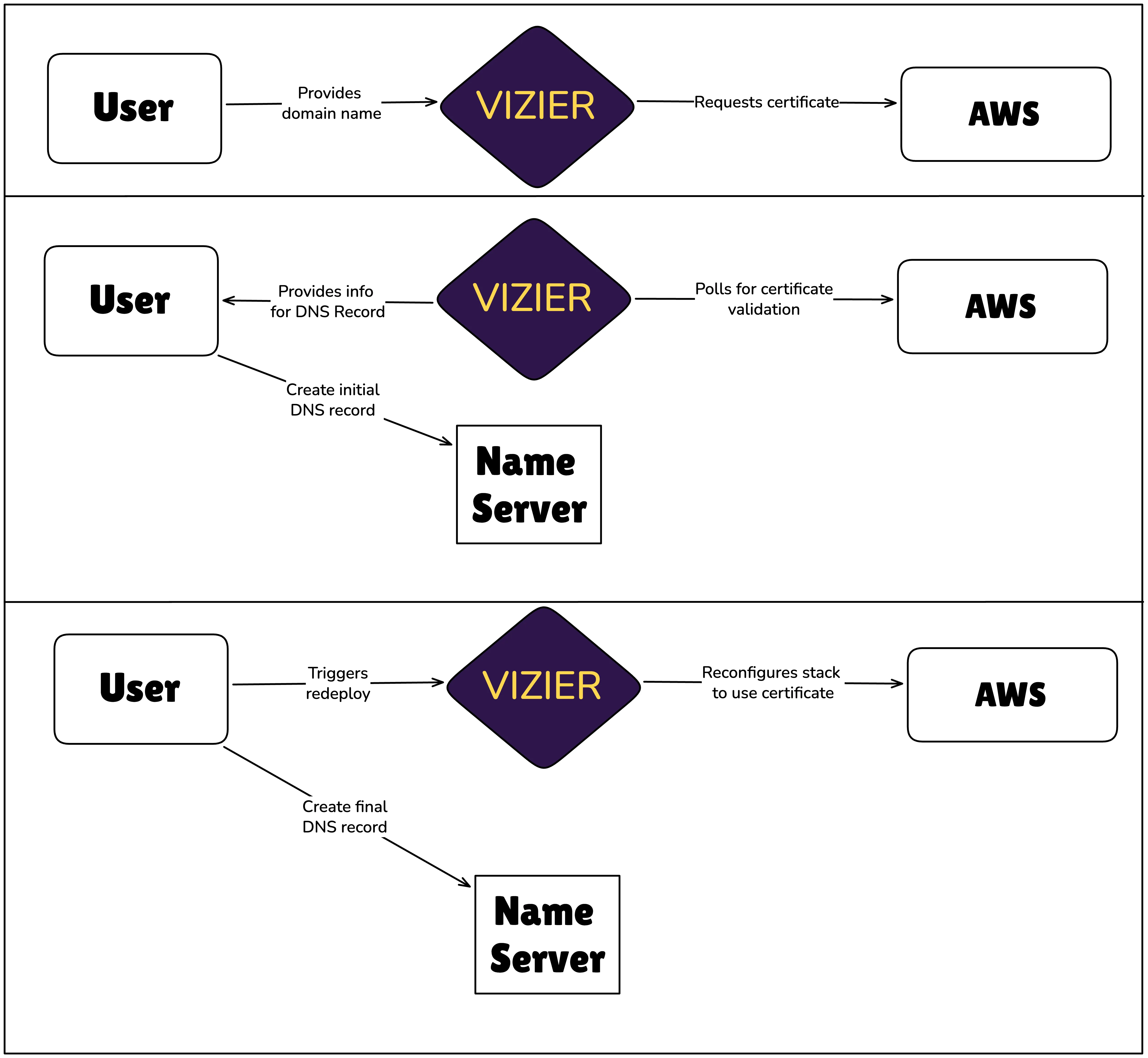
Section titled “Supporting Custom Domains”When Vizier deploys a project, it is immediately accessible at a randomly generated CloudFront URL, but users can also use a custom domain. Vizier automates certificate management and instructs the user on what DNS records to create. The following steps would be required to complete the process manually (without Vizier):
- In the AWS Certificate Manager (ACM), request a certificate for the custom domain.
- Create a DNS record that allows ACM to validate that the user owns the domain.
- Attach the certificate to the CloudFront distribution and configure the distribution to serve the custom domain.
- Create a DNS record mapping the custom domain to the CloudFront domain.
During implementation, certificate validation posed a problem for integrating into Vizier’s existing strategy of deploying the user’s application via CloudFormation stack. While a certificate can be declared in a CloudFormation template, the stack deployment will not complete until the certificate has been validated. For the certificate to be validated, the user needs to create a DNS record. Vizier can’t give the user instructions on that DNS record until the certificate has been requested. Integrating this validation into the stack deployment would result in adding a manual step the user needs to take in the middle of the lengthy deployment process (3-10 minutes, depending on stack type).
We opted instead to request and validate the certificate outside the CloudFormation stack deployment process. Vizier uses the AWS SDK to request a certificate, then instructs the user to create a corresponding DNS record for validation:
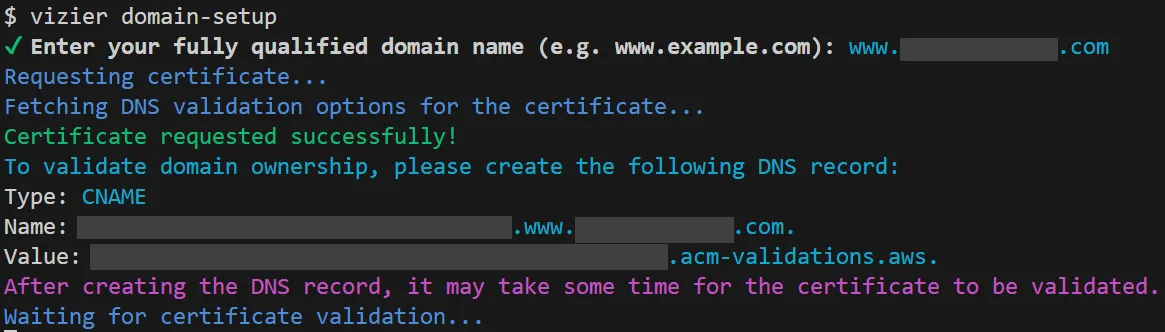
After printing these instructions, Vizier polls the certificate manager to await confirmation. Once the user has created the DNS record and the certificate manager has validated the certificate, a redeployment of the CloudFormation stack will use the validated certificate to configure the CloudFront distribution.

Finally, the user is instructed to create a DNS record actually directing traffic from their custom domain to their application:

Our approach complicated Vizier’s code, but streamlined the user experience. Moving the certificate creation outside the CloudFormation stack made it a resource Vizier has to keep track of and manipulate differently than the resources that are part of the stack. For instance, when a user wants to tear down the deployed resources, Vizier can tear down the stack with one CDK operation, but requires custom logic to destroy the certificate after the stack has been destroyed. On the positive side, we avoided placing a manual step in the middle of the deployment process. Deployment can still take several minutes but is hands off, while certificate creation provides immediate instructions and doesn’t take long.